
Beam
An app to share collections as a web link – straight from your device, without uploading to the cloud.
Beam Overview
The main view of the Beam app shows all available collections along with their current online status.
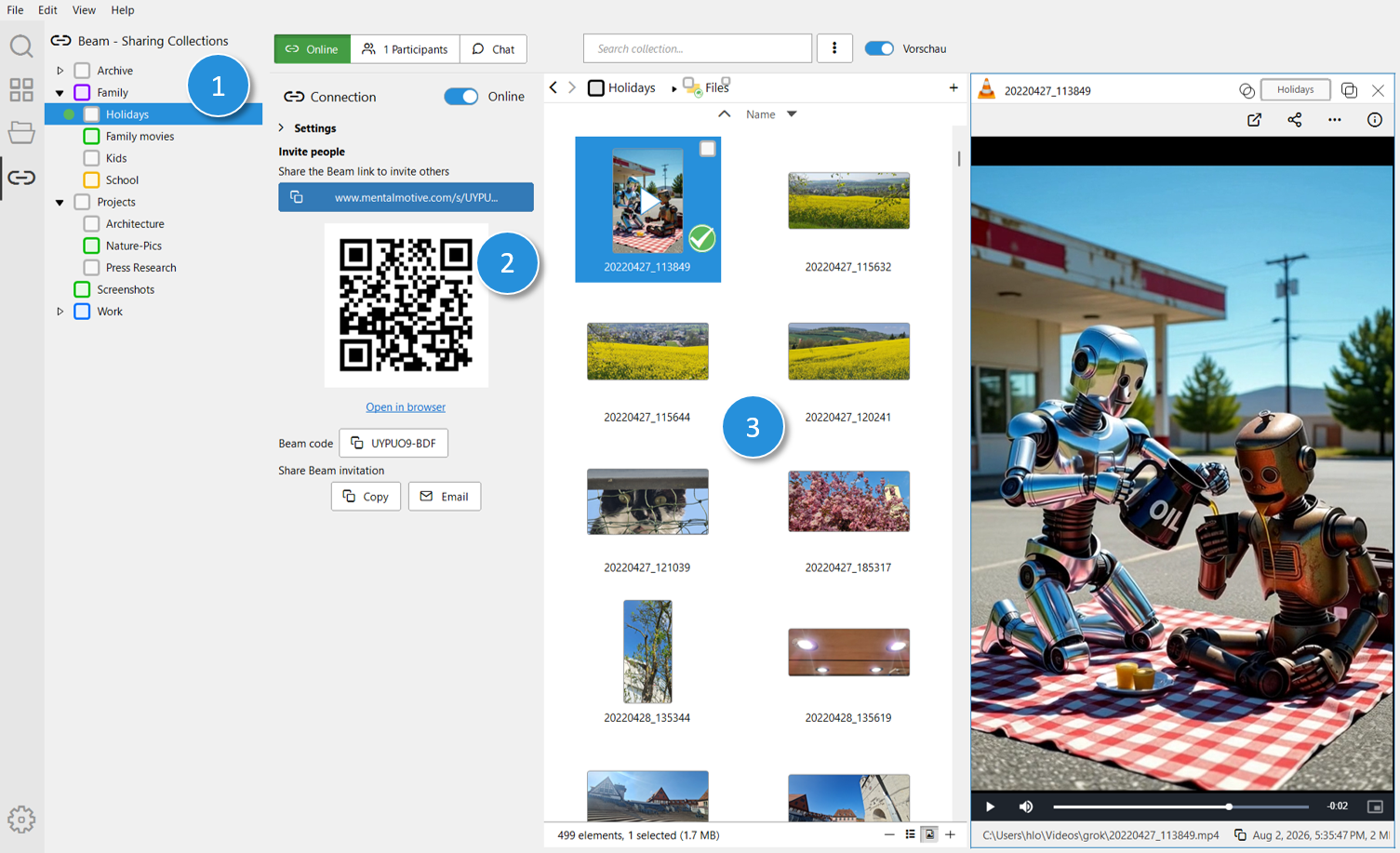
- Shared Collections — shows all collections as a tree. If a collection is shared, a green dot appears in front of the collection name.
- Beam Settings — for configuring a shared collection. Once the collection is switched online, sharing information is shown: the full link to copy with a click, a QR code to scan, the Beam code for manual entry, and buttons to copy or send an invitation.
- File List — shows all files in the selected collection. This is helpful for checking what will be shared before you share it.
Beam Settings
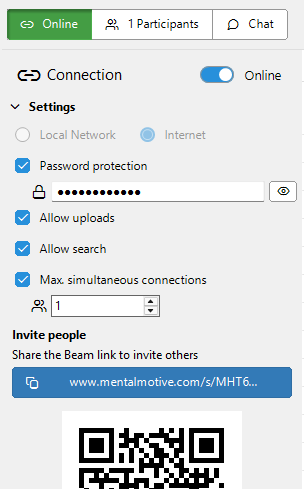
- Network type — determines which networks others can use to connect to your Beam, e.g. local network only or also over the internet.
- Password protection — protects the link with a password that recipients must enter before access.
- Allow uploads — lets recipients upload their own files into the shared collection.
- Allow search — lets recipients search the shared collection via full-text search.
- Max. simultaneous connections — limits how many people can be connected via the link at the same time.
Audio/Video Streaming
Audio and video files from a shared collection can be played directly in the browser without recipients having to fully download them first — playback starts while the rest of the file keeps loading in the background.
This also works reliably for large video files: jumping to any point on the timeline doesn't require waiting for the full download — that part of the file streams in directly.
Group Chat
Every collection shared via Beam comes with its own chat. Everyone connected via the link can use it to communicate — handy for discussing the shared content directly, without switching between memo and a separate messenger.
Connection Security
Beam uses WebRTC for data transfer, an open, standardized technology for real-time communication in the browser. It's already supported by all major browsers, so recipients don't need to install anything extra.
Transport Encryption
WebRTC encrypts connections at the transport level by default (DTLS/SRTP). This means the data transferred between your device and whoever opens the link is encrypted end-to-end and can't be read in plain text while in transit.
Signaling
Before two devices can establish a direct connection, they first need to find each other and exchange connection data (e.g. network addresses and connection parameters). This process is called signaling. Since no direct connection exists yet at this point, a signaling server briefly handles this exchange of information.
The signaling server only sees the metadata needed to establish the connection — not the content transferred afterward, which flows exclusively directly between the two devices.
The visible IP addresses are only valid for the duration of a single session: each new connection goes through the signaling process again, and there's no permanently stored or reused address mapping.
TURN Relay Fallback
Not every direct connection can be established — restrictive firewalls or NAT configurations can prevent it. For this case, Beam offers a TURN relay as a fallback by default: this is a coturn server with per-user and traffic-based quotas.
If the TURN fallback is used, data transfer no longer happens directly between the two devices, but through this relay server instead. Transport encryption via DTLS/SRTP is unaffected by this — content remains encrypted even when it passes through this additional relay point.
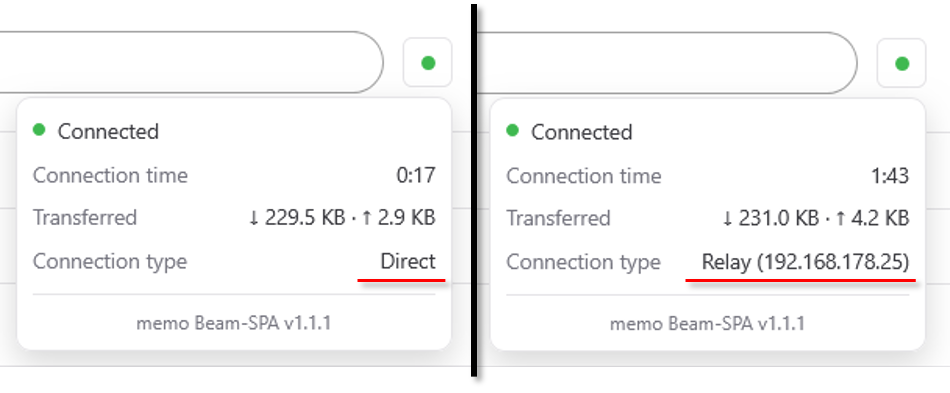
You can check how your current connection is established at any time: in the connection status, the "Connection type" field shows whether the connection is direct or going through a relay server (see image below).
FAQ
Is the connection in Beam encrypted?
Yes. Beam uses WebRTC, which encrypts connections at the transport level via DTLS/SRTP. The transferred data is encrypted end-to-end and can't be read in plain text while in transit.
If the connection is direct, why is a signaling server needed at all?
Two devices first need to find each other and exchange connection data before a direct connection can be established — this process is called signaling. Since no direct connection exists yet at this point, a signaling server briefly handles this exchange of information, before the actual data transfer runs directly between the two devices.
Can the signaling server see my shared content?
No. The signaling server only sees the metadata needed to establish the connection, e.g. network addresses and connection parameters — not the content itself. This content flows directly between the two devices in the normal case. Only if a direct connection isn't possible does the transfer instead go through the TURN relay fallback; the content still remains transport-encrypted in that case.
What happens if a direct connection can't be established?
In that case, Beam uses a TURN relay server as a fallback by default (a coturn server with per-user and traffic-based quotas). Data transfer then runs through this relay, but remains transport-encrypted via DTLS/SRTP.
Are IP addresses stored permanently by Beam?
No. Visible IP addresses are only valid for the duration of a single session. Each new connection goes through the signaling process again — there's no permanently stored or reused address mapping.
How can I see whether my connection is direct or going through a relay server?
You can check this at any time in the Beam web application: in the connection status, the "Connection type" field shows whether the connection is direct or going through a relay server.
Is Beam like BitTorrent or other P2P file sharing tools?
No. Beam sets up a direct, one-to-one connection between your memo instance and whoever opens the link — there's no tracker, no DHT, and no public swarm involved. Unlike BitTorrent, your files aren't distributed across a network of strangers; only the person you send the link to connects directly to you.